
Install and update
This page shows how to install VectorCraft on each system, what opens the first time you start it, how to check your version and update, which options VectorCraft takes when you start it from a terminal, where it keeps its settings, and how to uninstall it.
With ArtCraft Launcher
Section titled “With ArtCraft Launcher”ArtCraft Launcher installs, updates and opens every app in the Craft App Suite, VectorCraft included. It picks the right build for your system and processor, checks it against the release’s SHA-256 checksums before installing it, and tells you when an update is out.
- Download ArtCraft Launcher from its latest release and install it.
- Open ArtCraft Launcher and press Install on VectorCraft’s card.
By hand
Section titled “By hand”Every build is on VectorCraft’s latest release page; all releases has earlier versions and their notes. In the file names below, <ver> is the version number. SHA256SUMS.txt lists a checksum for every file.
Windows
Section titled “Windows”| Your PC | Installer | Portable |
|---|---|---|
| Most PCs (64-bit Intel or AMD) | vectorcraft-<ver>-windows-x64.msi |
vectorcraft-<ver>-windows-x64-portable.zip |
| ARM PCs, such as Snapdragon | vectorcraft-<ver>-windows-arm64.msi |
vectorcraft-<ver>-windows-arm64-portable.zip |
| 32-bit Windows | vectorcraft-<ver>-windows-x86.msi |
vectorcraft-<ver>-windows-x86-portable.zip |
By default, the installer installs VectorCraft for your account only and doesn’t need administrator rights. To install it for everyone on the computer, choose Everyone on this computer on the first page; this asks for an administrator. You can only have one copy installed, so to switch between the two, uninstall first.
The portable zip runs from any folder. While the portable.txt file sits next to vectorcraft.exe, VectorCraft keeps its settings, recovery copies and logs in a VectorCraftData folder beside it, so you can carry the whole folder to another computer.
The installers and programs are code-signed.
Download vectorcraft-<ver>-macos-universal.dmg, open it, and drag VectorCraft to Applications. It runs on Apple silicon and Intel Macs with macOS 11 or later, and is signed and notarized by Apple.
| Format | File | Notes |
|---|---|---|
| AppImage | vectorcraft-<ver>-linux-x86_64.AppImage |
Runs on most distributions; no install needed |
| Flatpak | vectorcraft-<ver>-linux-x86_64.flatpak |
Install with flatpak install --user <file> |
| Debian, Ubuntu | vectorcraft-<ver>-linux-x86_64.deb |
|
| Fedora, RHEL, openSUSE | vectorcraft-<ver>-linux-x86_64.rpm |
|
| Arch Linux | vectorcraft-<ver>-linux-x86_64.pkg.tar.zst |
Install with sudo pacman -U <file> |
| Tarball | vectorcraft-<ver>-linux-x86_64.tar.gz |
Unpack anywhere |
Every format also has an ARM64 build (aarch64 in place of x86_64). For RISC-V there is a .deb, an .rpm and a tarball (riscv64).
FreeBSD
Section titled “FreeBSD”Download vectorcraft-<ver>-freebsd-x86_64.tar.gz (or freebsd-aarch64 for ARM) and unpack it.
In a browser
Section titled “In a browser”vectorcraft-web-<ver>.zip is the web version. Unpack it onto any web server and open it in a modern browser. Serve it over https:// (or from localhost) so it can use the graphics card and the clipboard.
In the web version, saving and exporting download the file, and printing goes through the browser’s print dialog. It doesn’t check for updates.
First start
Section titled “First start”Open VectorCraft. When no document is open, VectorCraft shows the Home screen, titled Welcome to VectorCraft.
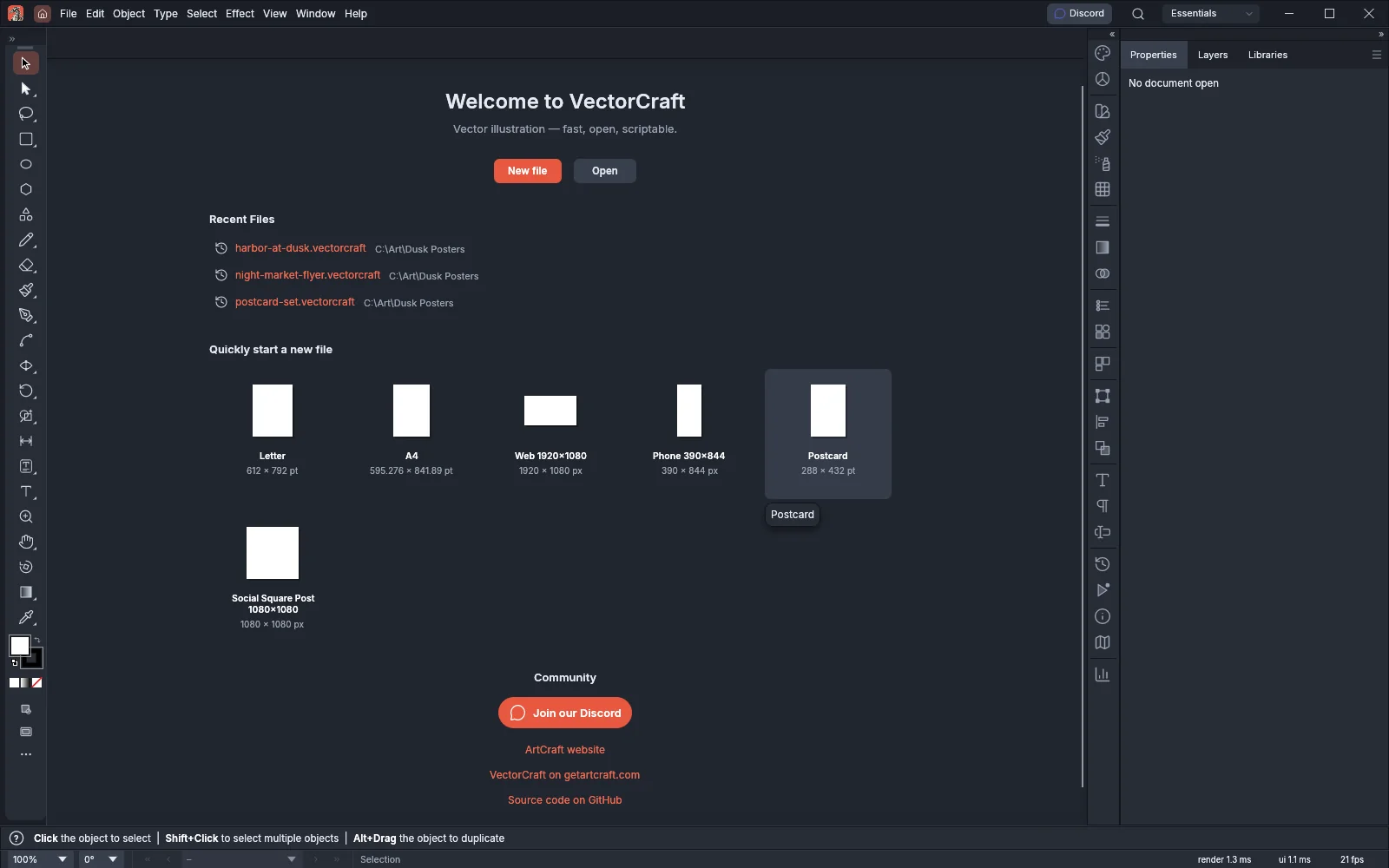
- Press New file to open the New Document window, or Open to open a file you already have.
- To start from a preset size, click one of the cards under Quickly start a new file: Letter, A4, Web 1920×1080, Phone 390×844, Postcard or Social Square Post 1080×1080. Each card shows its size.
- After you have saved or opened files, Recent Files lists up to six of them, each with the folder it is in. Click a file to open it, or point at it to see its full path.
The Community section links to the ArtCraft Discord server and websites. Use the Home screen describes each part. To show an empty window instead of the Home screen, turn off Show The Home Screen When No Documents Are Open in the General section of Preferences.
VectorCraft uses your system’s language when it has a translation for it, and English otherwise. To choose another language, set Language on the User Interface page of Preferences. Auto follows the system language. On macOS, you can also choose a language from VectorCraft → Language.
For a first project, follow Getting started. VectorCraft lists every guide.
Check your version
Section titled “Check your version”- Choose Help → About VectorCraft. On macOS, choose VectorCraft → About VectorCraft.
- Read the version on the About tab, after the word Version under the VectorCraft name.
- To see the credits, click the Contributors or Models tab.
- Close the window with its close button.
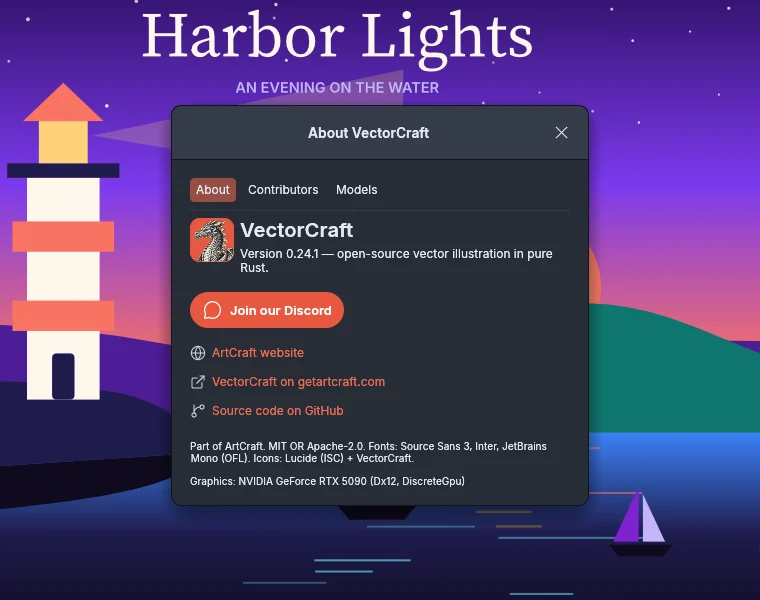
The last line of the About tab names the graphics processor VectorCraft draws with. Find your version for a bug report says what to put in a bug report.
On macOS, Linux and FreeBSD, run vectorcraft --version in a terminal. It prints the version, for example vectorcraft 0.22.0, and exits. Where the program is gives the path to use on each system. On Windows, read the version in the About window.
Update
Section titled “Update”VectorCraft checks for updates when it starts, and tells you when one is out. Your settings are kept outside the app’s folder, so updating keeps them.
When an update is out
Section titled “When an update is out”When a newer version is out, a prompt names the version you have and the new one, and offers these choices:
| Choice | What it does |
|---|---|
| What’s new | Opens the release notes in your browser. |
| UPDATE AND RESTART | Downloads and installs the update. It appears when your copy can update itself. If a document has unsaved changes, the prompt asks you to save or close your work first. While it downloads and installs, the prompt shows Downloading and installing update… and a DISMISS button, which closes the prompt while the update keeps installing. When the update is installed, the prompt asks you to close VectorCraft, and VectorCraft restarts by itself. |
| DOWNLOAD | Opens the release page in your browser. It appears in place of UPDATE AND RESTART when your copy can’t update itself. |
| LATER | Closes the prompt. Esc and the close button do the same. |
When you set ArtCraft Launcher to keep VectorCraft on a chosen version or on nightly builds, VectorCraft doesn’t show this prompt. Use ArtCraft Launcher to update it.
Check for updates yourself
Section titled “Check for updates yourself”- Choose Help → Check for Updates….
- Wait while the window shows Checking for updates….
- Read the result:
- If you have the newest version, the window shows a message such as VectorCraft 0.22.0 is the newest version available. Click OK. The window shows the same message when ArtCraft Launcher keeps VectorCraft on a chosen version or on nightly builds.
- If a newer version is out, the update prompt opens instead, with the choices in the table under When an update is out.
- If the check fails, the window shows Could not check for updates., the reason, and the address of the releases page. Click CHECK AGAIN to try again, or OK to close the window.
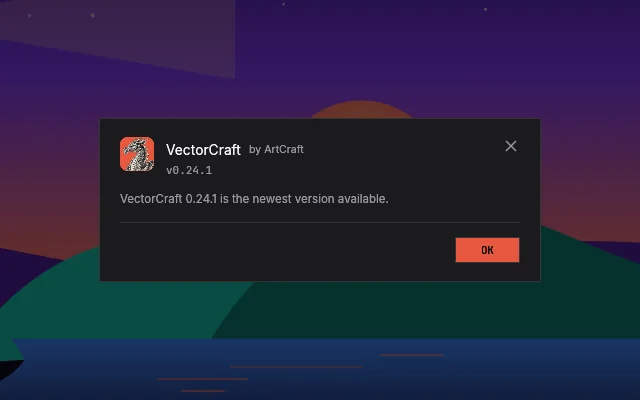
In the web version, Help → Check for Updates… opens a VectorCraft Updates window that says the update check is not supported in the web browser. Click OK to close it.
Install the new version
Section titled “Install the new version”- ArtCraft Launcher: tells you about new versions and updates VectorCraft for you.
- Installer, DMG,
.deb,.rpm, Arch package: install the new version over the old one. - AppImage: run AppImageUpdate on it, or download the new one.
- Flatpak, tarball, portable zip: download the new version and replace the old one. For the portable zip, keep the
VectorCraftDatafolder to keep your settings.
Start options
Section titled “Start options”You can start VectorCraft from a terminal with files to open and the options in the following table. On macOS, Linux and FreeBSD, vectorcraft --help lists them.
vectorcraft [options] [files…]Where the program is
Section titled “Where the program is”Only the Linux .deb, .rpm and Arch packages put vectorcraft on the command path. With the other downloads, type the program’s full path in place of vectorcraft:
| Download | Program |
|---|---|
| Windows installer, for your account | %LOCALAPPDATA%\Programs\ArtCraft\VectorCraft\vectorcraft.exe |
| Windows installer, for everyone | C:\Program Files\ArtCraft\VectorCraft\vectorcraft.exe (the 32-bit installer on 64-bit Windows uses C:\Program Files (x86)\ArtCraft\VectorCraft\vectorcraft.exe) |
| Windows portable zip | vectorcraft.exe in the unpacked vectorcraft-<ver>-windows-<arch>-portable folder |
| macOS | /Applications/VectorCraft.app/Contents/MacOS/VectorCraft |
Linux .deb, .rpm and Arch packages |
/usr/bin/vectorcraft, so vectorcraft works as typed |
| AppImage | The .AppImage file itself, for example ./vectorcraft-<ver>-linux-x86_64.AppImage |
| Flatpak | flatpak run ai.storyteller.vectorcraft, followed by the options and files |
| Linux and FreeBSD tarballs | bin/vectorcraft in the unpacked folder |
The Windows paths are the installer’s default folders. If you chose another folder during the install, the program is in that folder.
Options
Section titled “Options”| Option | What it does |
|---|---|
files… |
Opens each file in its own document tab. |
--new-instance |
Opens the files in a new VectorCraft window even when VectorCraft is already running. Windows, Linux and FreeBSD only. |
--in-window-menus |
On macOS, keeps the menus in a bar inside the window instead of in the menu bar at the top of the screen. Setting the environment variable VECTORCRAFT_IN_WINDOW_MENUS=1 does the same. |
--control <port> |
Starts the control server on <port>, which accepts connections only from your own computer. The port is a number from 1 to 65535; with any other value VectorCraft doesn’t start. Setting VECTORCRAFT_CONTROL_PORT does the same. AI agents shows how an assistant uses it. |
--automation-read-root <dir> |
Lets requests on the control port read files only inside <dir>. Give it more than once to allow several folders. VECTORCRAFT_AUTOMATION_READ_ROOT sets one folder. |
--automation-write-root <dir> |
Lets requests on the control port write files only inside <dir>. Give it more than once to allow several folders. VECTORCRAFT_AUTOMATION_WRITE_ROOT sets one folder. |
--version |
Prints the version and exits. On Windows, use the About window instead (Check your version). |
-h, --help |
Prints the list of options and exits. On Windows, use this table instead. |
The two --automation- options limit only requests that arrive on the control port, and VectorCraft ignores them without --control. You can still open and save files anywhere yourself. If a folder given to them can’t be used, VectorCraft doesn’t start. Keep the assistant to one folder has an example.
On macOS, type the options after the program’s path, for example /Applications/VectorCraft.app/Contents/MacOS/VectorCraft --in-window-menus.
On Windows, Linux and FreeBSD, when you open a file from the file manager (by double-clicking it, with Open With, or by dropping it on the program) while VectorCraft is running, the file opens as a new document tab in the running window, and that window comes to the front. Start VectorCraft with --new-instance to open the files in a new window instead. A copy started with --control or VECTORCRAFT_NO_PREFS neither sends its files to a running copy nor receives files from later ones. On macOS, Finder opens the files in the running VectorCraft.
To try VectorCraft with default settings without changing your saved ones, start it with VECTORCRAFT_NO_PREFS=1. Start with default settings shows the commands.
To convert files, run scripts or start the Model Context Protocol (MCP) server without opening a window, use vectorcraft-cli. See Run commands from the command line.
Where VectorCraft keeps its settings
Section titled “Where VectorCraft keeps its settings”VectorCraft keeps its settings in the file ui.json in its settings folder. It is the folder above logs in Find the log.
| System | Settings folder |
|---|---|
| Windows | %APPDATA%\VectorCraft\ |
| macOS | ~/Library/Application Support/VectorCraft/ |
| Linux and FreeBSD | $XDG_CONFIG_HOME/vectorcraft/, or ~/.config/vectorcraft/ when XDG_CONFIG_HOME is not set |
The settings folder also holds these folders:
| Folder | What it holds |
|---|---|
Swatches, Graphic Styles, Symbols, Brushes |
The swatch, graphic style, symbol and brush libraries you saved. |
Libraries |
The libraries of the Libraries panel. |
Fonts |
Fonts VectorCraft copied in, for example from the Missing Fonts dialog. |
Color Profiles, Plug-ins, PDF Presets |
Color profiles you loaded, plug-ins you installed and PDF presets you saved. |
Data Recovery |
Recovery copies of documents with unsaved changes. |
logs |
The log files. |
To keep your settings and libraries before you update or uninstall VectorCraft, copy the whole settings folder.
VectorCraft looks for its settings folder in this order:
- The folder named by the environment variable
VECTORCRAFT_CONFIG_DIR, when it is set. - A
VectorCraftDatafolder next to the program, when a file namedportable.txtorVectorCraft.portableis in the program’s folder. On macOS that is the folder that holds VectorCraft, and for an AppImage it is the folder that holds the.AppImagefile. The first time VectorCraft createsVectorCraftData, it copies your existing settings into it. If it can’t write to that folder, it uses the settings folder for your system and records a warning in the log. - The settings folder for your system, from the first table in this section.
Uninstall
Section titled “Uninstall”- Windows: in Settings → Apps, find VectorCraft and choose Uninstall. For the portable zip, delete its folder.
- macOS: move VectorCraft from Applications to the Trash.
- Linux: remove the package with your package manager, run
flatpak uninstall ai.storyteller.vectorcraftfor the Flatpak, or delete the AppImage or the unpacked tarball.
Your drawings are not touched. Settings stay in VectorCraft’s settings folder (see Where VectorCraft keeps its settings or Find the log for where it is); delete that folder to remove them too.