
Craft Anything
Craft Anything studies a website, a desktop or phone app, a game or a file with real inspection tools, then has a coding agent on your computer build your own version and checks it against the original. It is free and open source (MIT or Apache-2.0), written in Rust, and runs on Windows, macOS, Linux and FreeBSD.
How a project goes
Section titled “How a project goes”You point Craft Anything at a target, say what you want (“Recreate this website”, “A snake game in Rust”) and press Start. A project then goes through four steps:
- Study: Craft Anything inspects the original: its pages at several screen widths, its files, how it runs.
- Build: a coding agent makes a new project in the language, framework or engine your request names, or a sensible default.
- Check: Craft Anything compares the build with the original and lists what doesn’t match yet.
- Ready: open, play or preview the result, or ask for changes and it refines it.
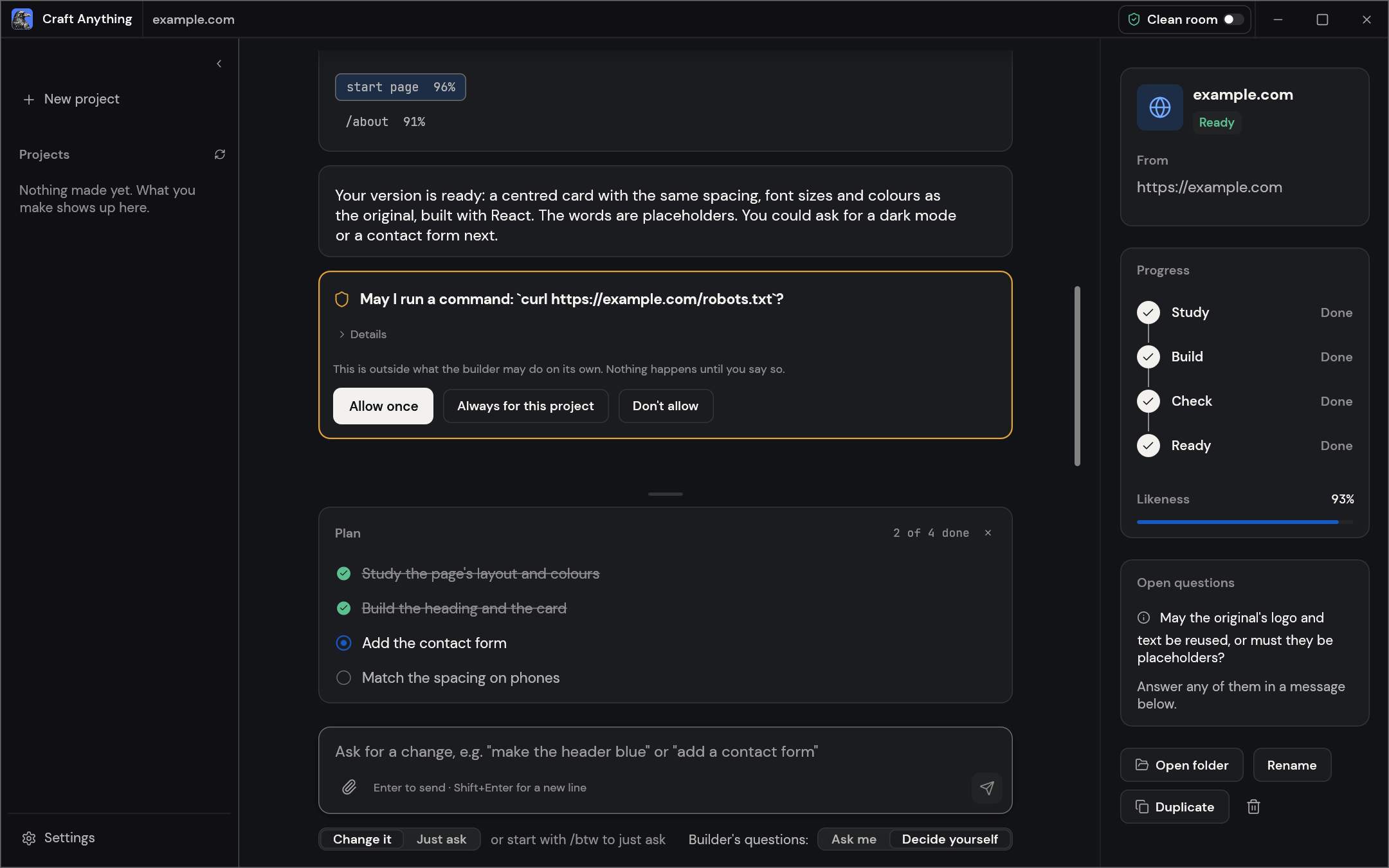
What the builder may do on its own
Section titled “What the builder may do on its own”By default, Auto mode is on: the builder keeps going without stopping to ask, and makes its own choices and says what it chose. Even then it never deletes anything outside its project, changes system settings or publishes anything.
To approve its actions yourself, turn off Auto mode in Settings → Safety. A card then asks before a kind of command it isn’t allowed yet, like the one in the picture above; common build commands such as npm install are allowed already.
Two ways to use it
Section titled “Two ways to use it”- Simple (the default): pick a website, an app or a game, describe what you want and follow the project page.
- Advanced: the full workbench, with every tool, functions, strings, pseudo-C, disassembly, hex, evidence and the agent console.
Both drive the same engine. Choose one in Settings → General → Mode. The interface comes in several languages; choose one in Settings → General → Language.
Clean room or Deep
Section titled “Clean room or Deep”- Clean room (the default) never reads inside the original: no code, files or page source. It works from what anyone can see: the pictures you add, a website as a visitor sees it, and, if you turn on Study apps by running them in Settings → Safety, a picture of an app’s window while it runs.
- Deep uses every tool, for your private use: a program’s code and files, a website’s JavaScript, and Ghidra when it’s installed.
What you need
Section titled “What you need”- To study a website: Chrome, Edge, Brave or another Chromium-based browser on your computer.
- To study a program or file: nothing extra. The built-in engines work without AI.
- To build: a coding agent on your computer. Claude Code is supported first, and DeepSeek Harness and GitHub Copilot CLI have built projects too; Workflows lists every option and how far each has been tested.
Your coding agent’s use falls under your own account and plan with its provider. Generated pictures and 3D models for games are optional and paid from your own fal.ai account.
Use it responsibly
Section titled “Use it responsibly”Use Craft Anything on software you own or are allowed to examine. It doesn’t bypass DRM, logins or anti-cheat, and the builder is told not to copy logos, photos or text unless you say you own them or have permission.