GridCraft
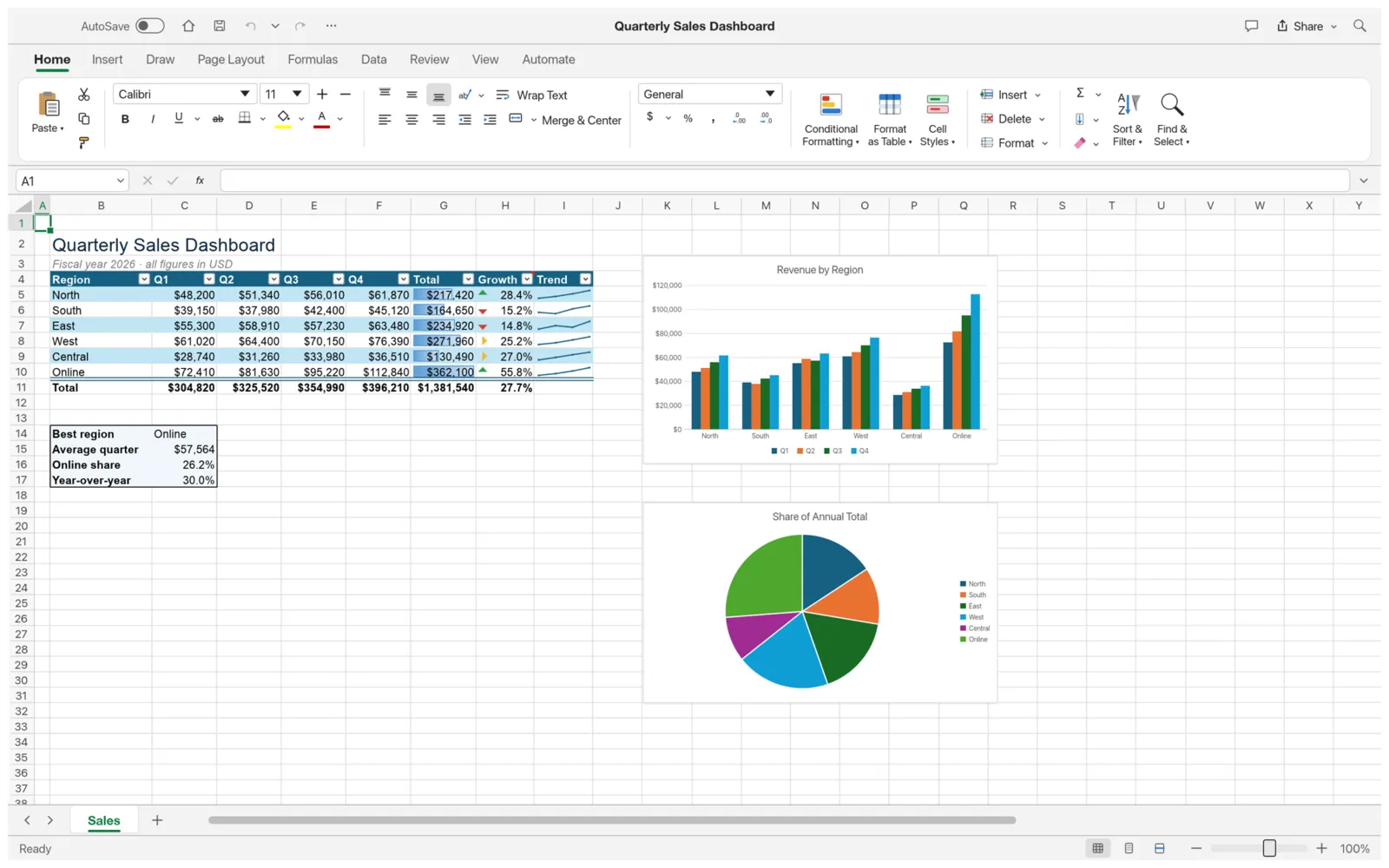
GridCraft is a spreadsheet app for working with numbers and data. If you have used a modern spreadsheet app, it will feel familiar: the ribbon, formula bar, Name Box, sheet tabs, tables, charts and pivot tables are all there. It opens and saves .xlsx files, and runs on Windows, macOS, Linux and FreeBSD. It is free and open source (MIT or Apache-2.0), and made by the ArtCraft team.
What it does
Section titled “What it does”- Formulas: hundreds of worksheet functions, including XLOOKUP, IFS, LET and LAMBDA. Dynamic-array formulas such as FILTER, SORT and UNIQUE spill their results into the cells around them.
- Formatting: number formats, cell styles, borders, conditional formatting with data bars, color scales and icons, and Format as Table.
- Tables and data: sort, filter, Flash Fill, Text to Columns, Remove Duplicates, data validation, grouping and subtotals.
- Charts: column, bar, line, pie, area, scatter and more, with sparklines in cells.
- Pivot tables: summarize a table by dragging fields between rows, columns, values and filters.
- Pictures and shapes: float a picture over the sheet, or place it inside a cell.
- Review: comments and notes, spelling, and protecting sheets and workbooks.
- Printing: Page Break Preview, print areas, print titles, printing and PDF export.
- Automation: record or write macros, and let AI assistants work with your workbooks.
- View: light and dark themes, and an interface in 19 languages.
Your files
Section titled “Your files”GridCraft saves workbooks as .xlsx. It also opens:
- .xlsm workbooks.
- .xls (Excel 97–2003) workbooks, with their values, formulas and number formats.
- .xlsb and .ods workbooks, as data only. Formulas come in as their last saved results.
- .csv, .tsv and .txt text files.
It exports a sheet as PDF, CSV or a web page (.html).
Your workbooks stay on your computer.
What you need
Section titled “What you need”Windows 10 or later (64-bit or 32-bit), Windows 11 on ARM, macOS 11 or later (Apple silicon or Intel), Linux, or FreeBSD.
Guides
Section titled “Guides”- Getting started: make and save your first workbook.
- Install and update: download GridCraft for your system.
- Workflows: formulas, tables, charts, pivot tables, printing and more.
- AI agents: let an AI assistant read and edit workbooks.
- Troubleshooting: fix common problems.