MaterialCraft
MaterialCraft is a node-based material designer. You build a material by connecting nodes in a graph, watch it update in a 2D view and on a 3D model, and export its maps (base color, normal, roughness, metallic, height and so on) for a game engine or a 3D app. It runs on Windows, macOS, Linux, FreeBSD and in a web browser. It is free and open source (MIT or Apache-2.0), and made by the ArtCraft team.
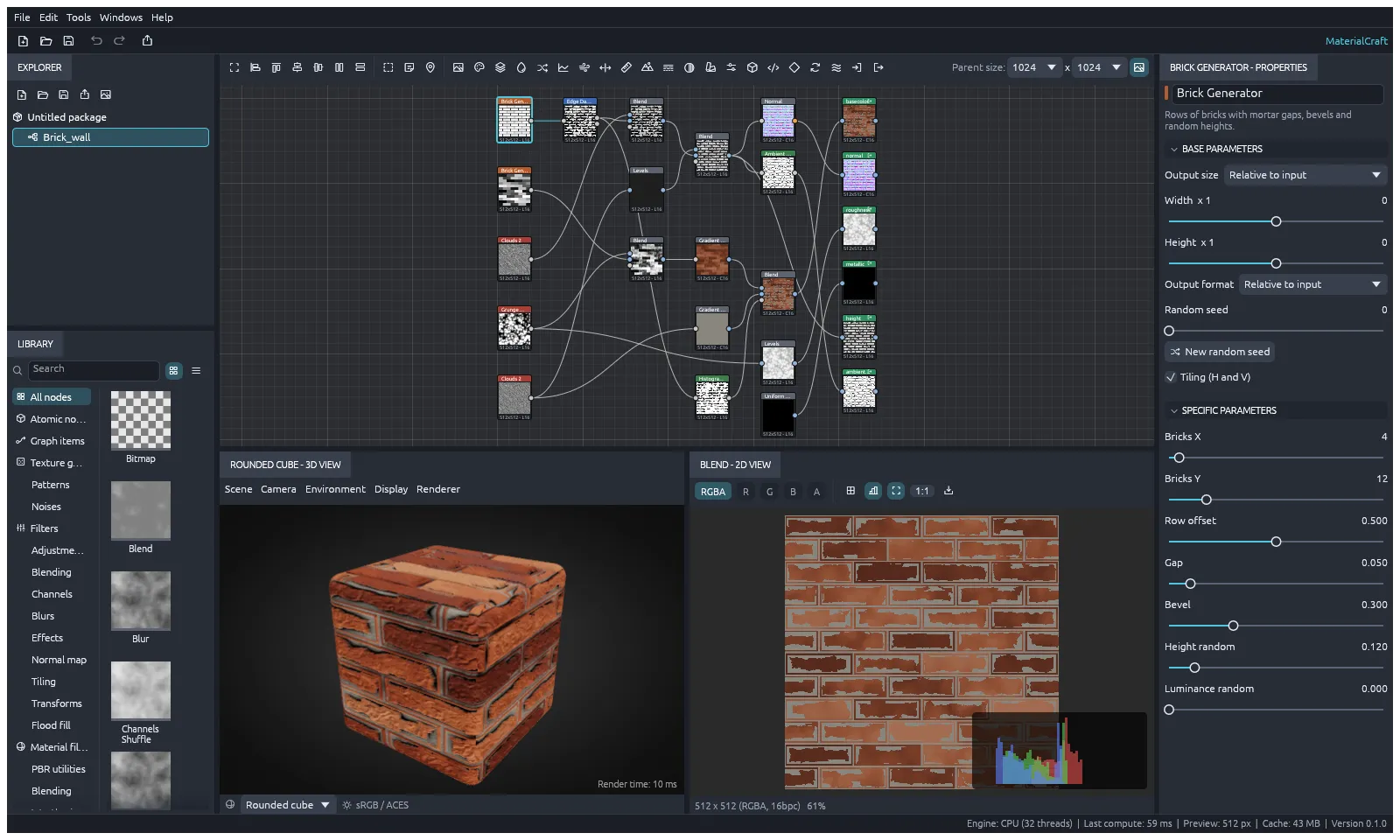
This screenshot is from MaterialCraft 0.1. The panels are the same today, but the nodes it shows have since been replaced.
What it does
Section titled “What it does”- Node graph: connect nodes with wires, group them in frames, add comments and reroute dots. Press Space over the graph to search for a node.
- Building blocks: blend, blur, levels, curves, gradient maps, HSL, warps, normal maps, transforms, text, SVG and bitmap images, and more.
- Functions: Pixel processor and Value processor nodes run a small function graph you build yourself, for effects no other node gives you.
- FX-Map: a node for patterns made by repeating and splitting shapes.
- Live previews: a 2D view of any node, and a 3D view of the whole material on a built-in shape or your own model.
- Export: write every output of a graph as image files, in one go.
Your files
Section titled “Your files”MaterialCraft saves your work as .sbs packages. A package can hold several graphs and the images they use.
It exports maps as PNG, JPEG, TGA, TIFF, BMP, WebP, OpenEXR or Radiance HDR, at 8, 16 or 32 bits. File › Export material… also writes a portable .mcmat material, with the maps and the graph together.
What you need
Section titled “What you need”- Windows (64-bit, ARM or 32-bit), macOS (Apple silicon or Intel), Linux, or FreeBSD.
- Or a modern web browser, for the web version.
Guides
Section titled “Guides”- Getting started: build your first graph and export its maps.
- Install and update: download MaterialCraft for your system.
- Workflows: nodes, wires, functions, previews, exporting and AI agents.
- Troubleshooting: fix common problems.