SoundCraft
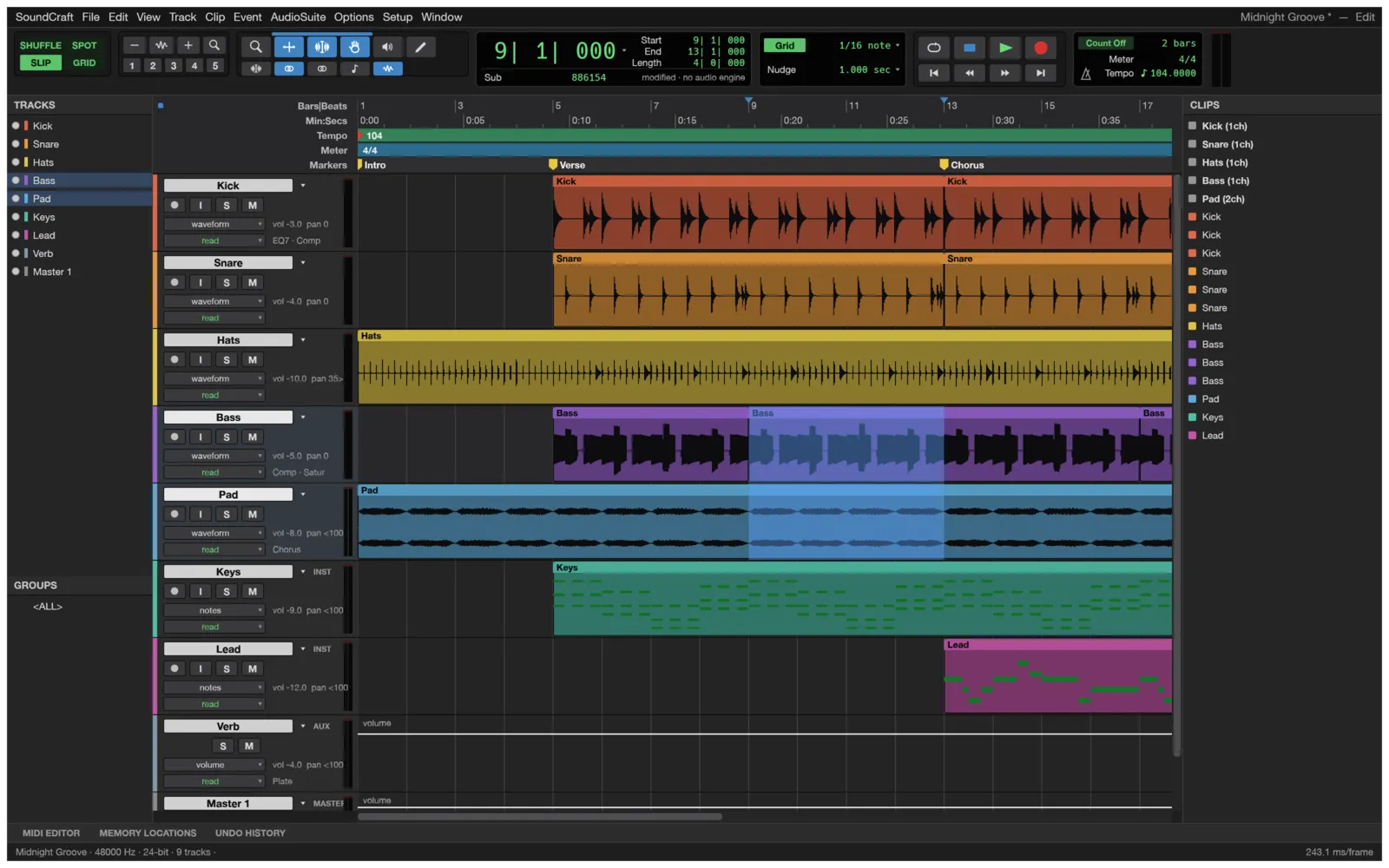
SoundCraft is a digital audio workstation (DAW) for recording, editing and mixing audio. It follows the workflow audio engineers already know: an Edit window for arranging and editing, a Mix window for balancing, edit modes, tools, playlists and memory locations. It runs on Windows, macOS, Linux, FreeBSD and in a web browser. It is free and open source (MIT or Apache-2.0), and made by the ArtCraft team.
What it does
Section titled “What it does”- Editing: Shuffle, Slip, Spot and Grid modes; Zoom, Trim, Selector, Grabber, Scrubber and Pencil tools; separate, duplicate, repeat, heal, consolidate and strip silence; fades and crossfades; playlists; undo for everything.
- Mixing: faders, pan, sends, busses, aux inputs, master faders, VCAs and folders, with automatic delay compensation for plugins.
- Automation: volume, pan, mute, sends and plugin parameters, drawn by hand or recorded from the faders.
- Plugins: EQs, dynamics, reverbs, delay, modulation and more, all built in. It also loads CLAP and VST3 plugins, and Audio Units on a Mac.
- Instruments and MIDI: a subtractive synth, a drum synth and a sampler; a MIDI editor with a velocity lane, a score view, quantize and transpose; Standard MIDI File import and export.
- Recording: punch in, pre- and post-roll, loop recording, and input monitoring.
- Video: a video track with thumbnails, and a Video window that follows the playhead.
- Bounce: the mix to WAV, AIFF or FLAC, with the peak and loudness (LUFS) reported when it’s done.
- Agents and scripts: every command can also be run from the command line or by an AI assistant.
Your files
Section titled “Your files”SoundCraft saves a session as a .scraft file in a folder of its own, with its audio in an Audio Files folder beside it.
It imports WAV (including BWF and RF64), AIFF, FLAC, MP3, Ogg Vorbis, AAC, ALAC and CAF audio, and MIDI files. It bounces to WAV, AIFF and FLAC. It exports MIDI files and MusicXML for notation programs. Video tracks play MP4 and QuickTime (MOV) movies in H.264, ProRes or Motion JPEG.
Everything runs on your computer. Your sessions stay there.
What you need
Section titled “What you need”- Windows (64-bit, ARM or 32-bit), macOS 11 or later (Apple silicon or Intel), Linux or FreeBSD.
- Or a modern web browser, for the web version.
Guides
Section titled “Guides”- Getting started: open the demo song, make a session and bounce it.
- Install and update: download SoundCraft for your system.
- Workflows: editing, recording, mixing, plugins, automation and MIDI.
- AI agents: let an AI assistant build and mix sessions.
- Troubleshooting: fix common problems.