TextureCraft
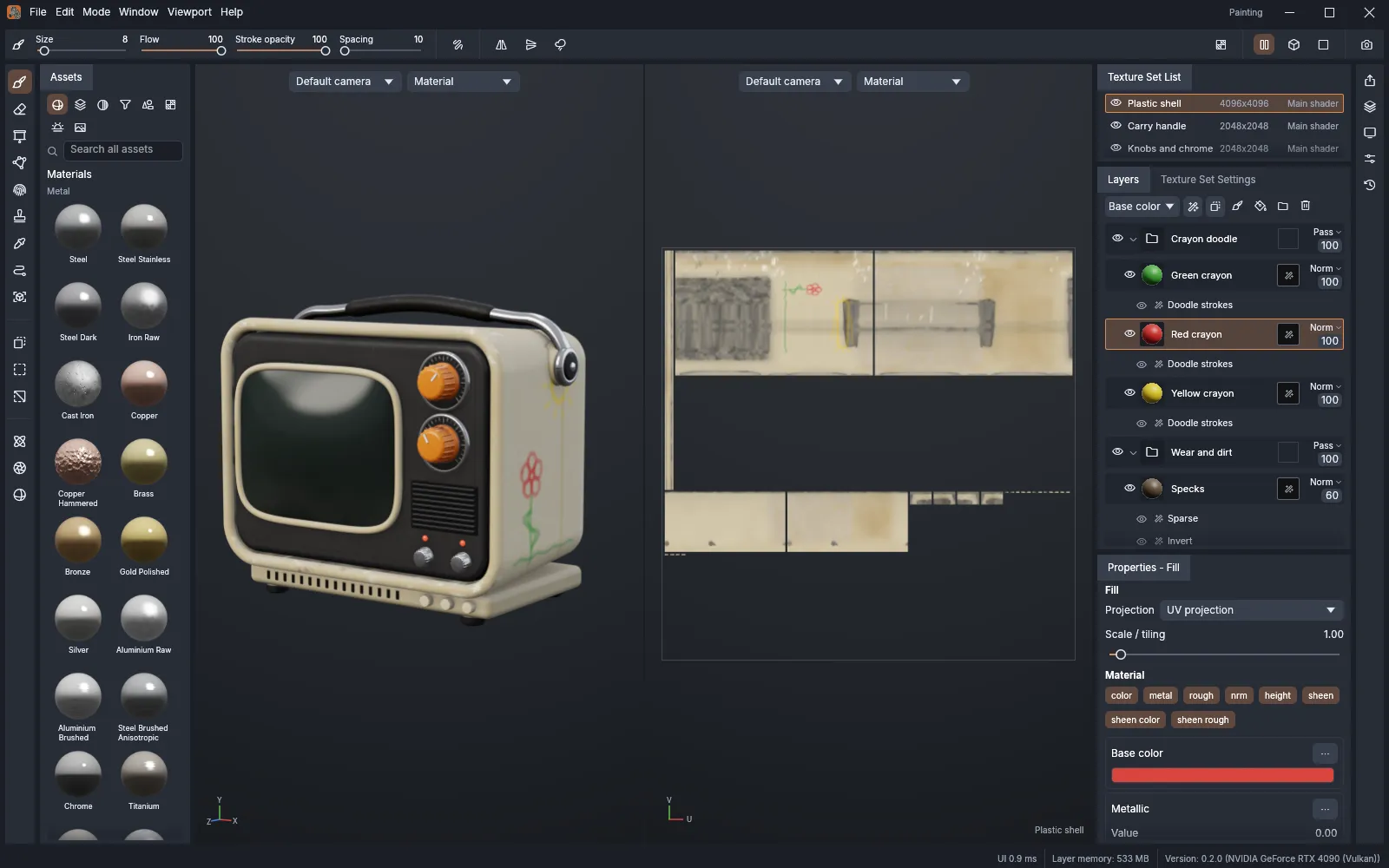
TextureCraft is a 3D texture painting app. You load a 3D model, paint materials straight onto it in layers with masks, bake mesh maps, and export the textures for a game engine or another 3D app. If you have used a modern texture painting app, the layout will feel familiar: texture sets, a layer stack, smart materials, a tool shelf, and side-by-side 3D and 2D views. It runs on Windows, macOS, Linux, FreeBSD and in a web browser. It is free and open source (MIT or Apache-2.0), and made by the ArtCraft team.
What it does
Section titled “What it does”- Paint in 3D: brushes, eraser, projection with image stencils, polygon fill, path and lasso fill, smudge, clone, a particle brush, text and decals. Strokes flow across UV seams. You can also paint in the 2D UV view.
- Layers and masks: paint, fill and folder layers, a blend mode and opacity for each channel, masks with generators, filters and paint.
- Materials: a shelf of procedural materials, smart materials and smart masks that work at any resolution. Save your own smart materials too.
- Bake mesh maps: ambient occlusion, curvature, thickness, normals, position, ID and more, on the graphics card or the processor.
- Export: presets for Unreal Engine, Unity, Godot, Blender, glTF and OpenPBR, or your own output templates with channel packing.
- Render: Rendering mode (F10) path traces your textured model, with a denoiser.
Your files
Section titled “Your files”TextureCraft opens 3D models in glTF and GLB, FBX, COLLADA (.dae), USD (.usd, .usda, .usdc, .usdz), Alembic (.abc), OBJ, PLY and STL. If a model has no UVs, TextureCraft makes them.
Your work is saved as a single .tcraft project file. It holds the model, every layer, the baked maps and the images you imported.
Textures export as PNG, JPEG, TGA, TIFF, BMP, WebP, EXR or HDR, at 8, 16 or 32 bits, with UDIM tiles. You can also export the textured model as OBJ, GLB or USD.
What you need
Section titled “What you need”- Windows (64-bit, ARM or 32-bit), macOS (Apple silicon or Intel), Linux, or FreeBSD.
- A graphics card that supports Vulkan, Metal or DirectX 12.
- Or a modern web browser with WebGPU or WebGL2, for the web version.
Guides
Section titled “Guides”- Getting started: paint your first model and export its textures.
- Install and update: download TextureCraft for your system.
- Workflows: layers, masks, baking, exporting and rendering.
- AI agents: let an AI assistant paint, bake and export for you.
- Troubleshooting: fix common problems.